StackJack AI Governance is in public beta, plus a free incident response skill for the MSP Process notice
StackJack AI Governance
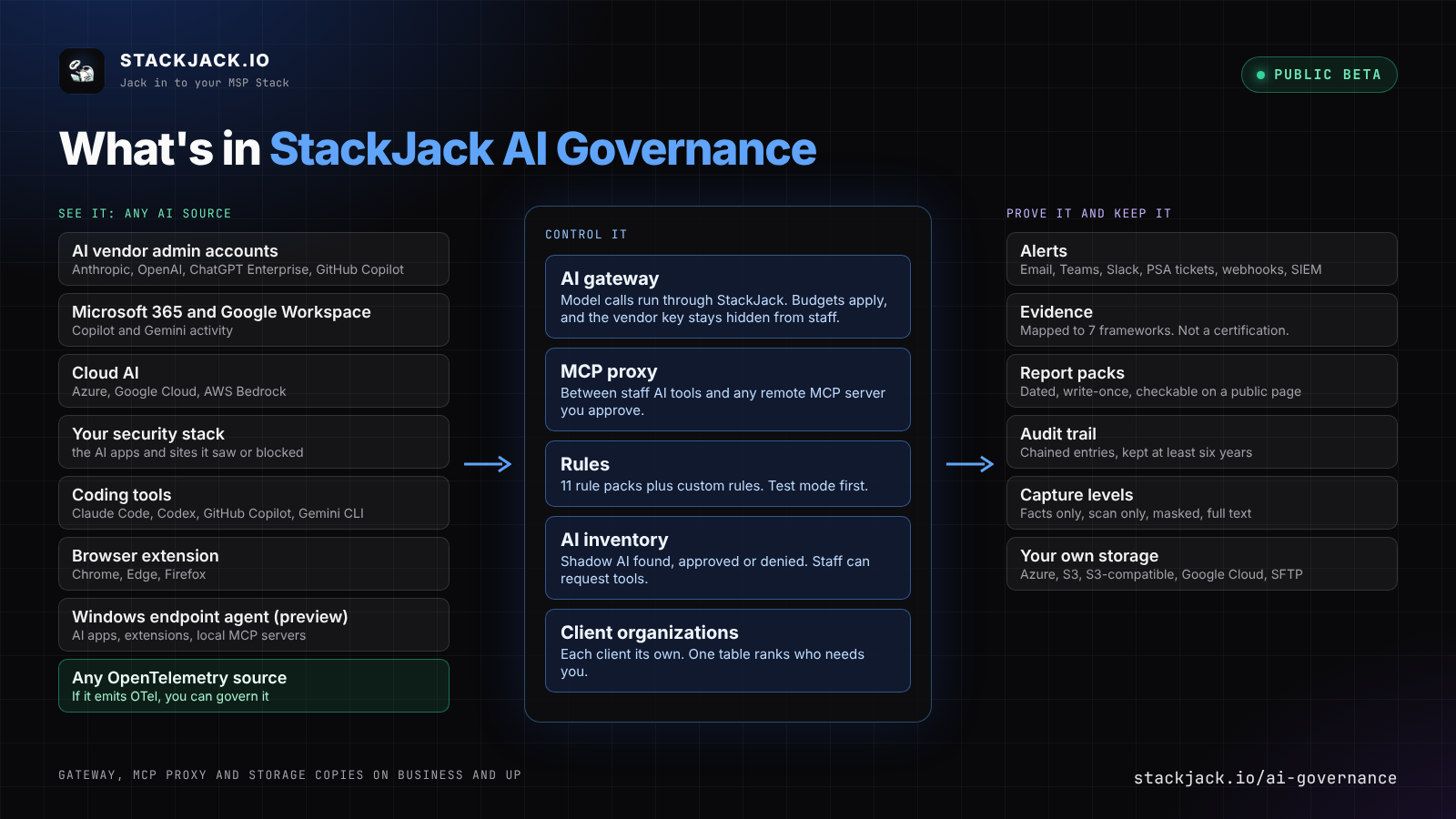
StackJack AI Governance is in public beta, and every StackJack account can turn it on today, Free accounts included. It's a full AI governance suite for MSPs: it governs any AI source, controls what it finds, keeps the evidence, and does it for every client from one place.
See it. AI Governance connects to the AI vendors' admin accounts, Microsoft 365 and Google Workspace, cloud AI on Azure, Google Cloud and AWS Bedrock, your security stack and your coding tools, and anything that emits OpenTelemetry can be a source too. The shadow AI those sources turn up lands in one inventory you approve or deny. For the clients who need more, a browser extension covers Chrome, Edge and Firefox, and a Windows endpoint agent (preview) finds installed AI apps, AI browser extensions and local MCP servers.
Control it. Your own rules plus 11 rule packs, and every rule starts in test mode. On Business, an AI gateway checks every model call that runs through it, applies budgets and holds the vendor key so staff never see it, and an MCP proxy sits between your staff's AI tools and any remote MCP server you approve, StackJack's or anyone else's, and holds that server's credential. Alerts go to email, Teams, Slack, a ticket in your PSA or a signed webhook, and to your SIEM on Enterprise.
Prove it. Evidence mapped to seven frameworks (StackJack's mapping, not legal or audit advice). AI use policies your clients' staff accept. Dated report packs anyone can verify on a public page. An audit trail nobody can edit, kept at least six years.
Keep it where you want it. You choose how much is stored, from facts only to full text. On Business, a verified copy goes to your own Azure Blob Storage, AWS S3, S3-compatible store, Google Cloud Storage or SFTP server.
Every client, one place. Each client gets its own organization with its own people, rules, roles and records, and the All clients table ranks them by who needs you first. When you want new clients, the prospect scan reads a company's Microsoft 365 with its permission and hands you a report under your logo. It never reads prompts, mail or files, it changes no setting, and the only trace it leaves is one audit log search named "StackJack exposure scan".
Start with your own organization. Open AI Governance in the Portal and Get started walks you through setup, including a first scan of your own Microsoft 365. That works on every plan. AI Governance is billed on its own, with its own invoice, separate from your connector subscriptions. There are four plans: Free, Pro, Business and Enterprise, and paid plans include the Anthropic Admin, OpenAI Admin and GitHub Copilot connectors. Client organizations have their own charges on top of your plan, there is no fee for each person in a client organization, and you get an email before the first charge. Prices are on the page. It's a public beta: you can sign up and buy today while we keep building, so screens and features can still change.
Free incident response skill for the MSP Process notice
If your organization got the security notice MSP Process sent its customers on November 7, we built a free skill for the cleanup. Download it at stackjack.io/mspprocess with no email and no checkout. It works with or without a StackJack subscription.
What it does. It takes MSP Process's own remediation checklist and has your AI assistant (Claude, Codex or ChatGPT) work through it across every client tenant in your GDAP list, in seven phases: contain in your partner tenant, preserve evidence in every affected tenant, investigate each client tenant, check Microsoft Defender for Endpoint, check Azure, remediate, and report. In each client tenant it checks for password resets, MFA and Temporary Access Pass changes, new app credentials, new permission grants, inbox rules and mail forwarding. It stays read-only until you approve the exact change, and the per-tenant report never calls a tenant clean for a check that didn't run. What takes hours or days of digging through logs by hand takes minutes.
Export your logs first. Entra ID Free keeps audit and sign-in logs for 7 days (30 on P1 and P2), so November 7 events on Free tenants start expiring around November 14 at 09:00 UTC. The skill exports them before it investigates.
If you use StackJack's Microsoft connectors, read this before you start. Revoking the connecting admin's sessions, which is step two of MSP Process's checklist, kills every refresh token that admin holds, including your StackJack Microsoft connections if that admin signed them in. Sign in to those connections as a different admin first, or plan to reconnect after containment. The skill asks you to pick before it changes anything.
For affected organizations. We're also giving 30 days of Pro at no charge on our Microsoft Azure, Microsoft 365 (Graph) and Microsoft Defender for Endpoint connectors, redeemable on the same page until December 7, and you can cancel anytime from Billing in the Portal before it renews. If you already pay for Pro on one of those connectors, that subscription isn't discounted. The skill is free for you either way.
If it misses something you find in your tenants, tell us at support.stackjack.io and we'll add it.
Open AI Governance in the Portal · See the AI Governance page · Get the MSP Process skill
Ceej
Product names are trademarks of their owners. Their use does not imply endorsement.